FOX 8 Weather
- 4.7
- Rating
- 100.00K
- Installs
- Free
- Price

 Analysis by App-foxy
When I want a quick weather check before leaving home, I usually prefer a focused local forecast over a crowded app that tries to cover every possible weather service. FOX 8 Weather takes that simpler route. It is a free weather app from Gray Media, built around the FOX 8 weather experience, and it feels most useful when several people in the same household need the same local information without turning the phone into a complicated planning tool.
I tested it with ordinary routines in mind: checking conditions before a school run, deciding whether a walk could wait, and looking at the forecast before heading to work. The app is not trying to replace a full travel planner or a specialist severe-weather platform. Its strength is being an accessible weather reference for everyday decisions. That focus is also its main limitation, because users who want extensive customization, broad international coverage, or advanced meteorological analysis may eventually prefer a larger weather service.
How FOX 8 Weather fits into a shared household routine
The most natural way to use FOX 8 Weather is as a common reference point. One person can check the forecast in the kitchen, another can look again from a personal phone, and everyone can work from the same local weather source when deciding what to wear or whether to change plans. That sounds basic, but it matters in a busy home: a clear, dedicated weather app is easier to pass around than a general news feed full of unrelated stories.
You May Also Like

 Blood Strike: 2.5 Anniversary
Blood Strike’s Loadouts Turn Every Drop Into a Tactical Gamble
A close look at Blood Strike’s custom loadouts: how fast access to signature weapons reshapes its battle royale rhythm, rewards preparation, and narrows the gap between fights.

 Pandora - Music & Podcasts
Pandora’s Music Is Easy to Start, but Harder to Recover
Pandora’s strength is its low-effort path from a seed to a station. Its weak spot is how much confidence it asks you to place in connection, setup, and quiet recovery.

 8 Ball Pool
 Is Built on Rivalries, Rematches, and Routine
A close look at the rivalries, rematches, shared routines, and unanswered safety questions that turn a quick pool match into a persistent mobile community.

 Samsung Music
’s Quiet Strength Is Playing What You Already Own
Its reach comes less from spectacle than from dependable access to a personal library. That simplicity is both the app’s strongest retention engine and its ceiling.

 AccuWeather: Weather Radar
AccuWeather Review: A Quick, Clear Forecast for Everyday Decisions
For everyday plans, the best forecast is the one you can understand quickly. AccuWeather makes rain timing, radar, and local conditions easy to act on, with a few trade-offs.

 Hill Climb Racing
Why Hill Climb Racing Still Turns Crashes Into One More Run
A tiny car, a bumpy hill and one more upgrade: Hill Climb Racing keeps resurfacing because its simple chaos makes every near-miss feel personal.
More From Our News Desk



Imagine a weekday morning when one parent is preparing breakfast, a teenager is getting ready for school, and someone else is trying to decide whether to walk the dog. The useful workflow is not to study every screen for several minutes. It is to open the app, check the current conditions, look ahead at the day, and make a practical choice. FOX 8 Weather suits that kind of short visit. I found its value less in entertainment and more in reducing small uncertainties before leaving the house.
That shared-device angle also changes what I expect from it. I do not need a weather app to become a family dashboard, and I would not assume that every household member sees a personalized experience. Instead, I treat it as a public information tool on whichever phone is available. If several people use one device, the next person can simply open the app and check the forecast rather than inheriting a private account or a complicated profile.
The important household advantage is simplicity, not deep personalization. Someone who only needs a dependable glance at local conditions can understand the purpose immediately. A person looking for detailed planning tools, extensive saved locations, or a highly configurable home screen should compare it with broader weather alternatives before settling on it.
What I noticed during everyday checks
On a normal day, I would use the current view first, then move toward the forecast when the decision involved several hours rather than the next few minutes. That distinction is useful. Current conditions answer “what is happening now,” while the forecast helps with “should I change my plans later?” Keeping those questions separate prevents the common mistake of assuming that a pleasant morning guarantees a comfortable afternoon.
I also found it helpful to check the app at the moment a decision is made instead of relying on an earlier glance. Weather changes, and a forecast seen before breakfast may not be the one I want before an evening trip. This is not a special feature; it is a sensible way to use a weather tool. FOX 8 Weather works well for that repeated, brief-check pattern because its purpose is clear every time I open it.
For a household, another practical habit is to make one person responsible for checking conditions before a shared outing, then communicate the result in ordinary language. “Bring a jacket” or “let’s leave earlier” is more useful than forwarding a screen without context. The app supplies the information, but the coordination still happens between people. I would not treat it as a substitute for conversation or planning.
Setup, boundaries, and the right expectations
FOX 8 Weather is available at no cost, carries an Everyone content rating, and supports Android devices running version 9 or later. Those details make it approachable for a mixed household where an older phone may still be in use alongside a newer one. The current version is 6.2.512, so anyone installing it should still check that the intended device meets the operating-system requirement before expecting a smooth installation.
The setup boundary I would keep in mind is that this is a weather app, not a household management system. I would not install it expecting shared calendars, chores, messaging, or child-specific dashboards. Its role is narrower: open it when you need weather information, interpret that information, and decide what to do. That narrow role is a positive for people who dislike apps that ask them to build an entire routine around the product.
On a shared phone or tablet, I would also be careful about treating the screen as a neutral family resource. Weather itself is not especially private, but the device may belong to one person, and any settings or location choices should be handled by the device owner. If a child uses the phone to check whether outdoor play is possible, an adult can help interpret the forecast rather than assuming the app makes the decision automatically.
There is a useful trade-off here. A dedicated weather app can be less distracting than opening a social platform or a general news application, but it may provide fewer surrounding tools than an all-in-one service. If your ideal setup includes weather alongside radar layers, travel planning, calendars, and detailed alerts in one place, FOX 8 Weather may feel intentionally limited. If you want a quick local check without building an account-centered workflow, that limitation can feel refreshing.
Keeping the app useful without overcomplicating it
My advice is to decide what the household actually needs before changing habits around the app. If the goal is simply to know whether to carry an umbrella or adjust a departure time, open it at the relevant moment and keep the decision simple. If the goal is to coordinate a long outdoor event, use the app as one input and continue checking conditions as the event approaches.
That second point is especially important. A forecast is guidance, not a guarantee. I would avoid using one early check as permission to ignore changing conditions later. For children, older relatives, or anyone spending a long time outdoors, an adult should make the final judgment based on the latest information and the person’s comfort and safety needs. FOX 8 Weather can support that conversation, but it does not remove the need for human judgment.
I also would not confuse a high store rating with a promise that every user will have the same experience. The app has an average rating of 4.7 from around 3.7 thousand ratings, which suggests strong user satisfaction overall. That is encouraging, but ratings do not tell me whether the app matches a particular household’s preferred forecast style, location habits, or need for advanced tools. I would read the rating as a sign that the basic experience works well for many people, not as proof that it is the best choice for every situation.
Coordination without turning weather into another chore
The best household use I found is lightweight coordination. Before a morning commute, one person checks the conditions and mentions anything that affects the group: rain, cold, heat, or a likely change later in the day. Before a weekend walk, someone checks again closer to departure. This creates a small but practical routine without requiring every family member to become a weather enthusiast.
For shared devices, I would keep the app in an easy-to-reach place and avoid hiding it inside a crowded folder. That is a tiny organizational choice, but it makes a difference when someone has only a few seconds to check the forecast. The person using the device should be able to recognize the app immediately, especially if the phone is passed between adults and children.
Another useful approach is to separate personal preferences from shared decisions. One person may care about outdoor exercise, another about driving, and another about school clothing. The same forecast can answer all three questions, but each person may need a different conclusion. FOX 8 Weather is useful as the common source; it should not be expected to understand everyone’s personal schedule automatically.
This is where I think it compares favorably with a general search engine. Searching the web for weather can work, but it adds extra steps and may lead to inconsistent sources or distracting results. A dedicated app gives the household a repeatable place to look. On the other hand, a major multi-location weather platform may be better for families spread across different cities, frequent travelers, or people who want extensive map and alert controls. FOX 8 Weather makes more sense when local, quick access matters more than breadth.
For a family trip, I would use it in stages. First, check the local conditions before leaving. Next, check again near the destination if the trip is long enough for the weather to change. Finally, make sure the person responsible for the group knows what the forecast means for clothing, transportation, and outdoor time. This workflow avoids overreliance on a single glance and uses the app where it is strongest: quick, practical reference information.
Where the coordination model has limits
The app is not the right answer if the household needs everyone to receive a tailored schedule or if each person requires a different set of locations. In that case, a more feature-heavy weather service may save time despite being more complicated. I would also look elsewhere if my main purpose were detailed storm analysis, international travel planning, or a dense map-based view that I could customize extensively.
There is also a human limitation that no weather interface can solve. People may check the same forecast and still make different choices. One person may be comfortable walking in light rain, while another may need to avoid it. The app can help the household discuss the situation, but it cannot settle those preferences. I see that as a reason to use the app thoughtfully, not as a flaw unique to this product.
Because the app is free, it is easy to try without committing money. That lowers the risk for a household deciding whether a focused local weather tool is enough. Still, free does not automatically mean complete. I would install it first for the everyday basics, then judge it by whether it answers the questions my household actually asks. If I keep needing another app for the important details, using both may be less convenient than choosing one broader alternative.
Age, trust, and responsible use
The Everyone rating makes FOX 8 Weather suitable in age terms for a broad household audience. A child can understand the basic purpose of checking the weather, and an older family member can use it for routine planning without needing to learn a complicated entertainment interface. That said, an age rating is not a substitute for supervision or explanation. Younger users may still need help understanding that a forecast describes expected conditions rather than certainty.
I would teach a child to use the app for simple questions: Is it likely to rain soon? Should I take a coat? Is outdoor play worth postponing? For more serious decisions, such as staying outside for a long period or changing travel plans, an adult should review the information too. The app supports a conversation between parent and child; it should not be treated as an independent authority making safety decisions.
Trust also depends on using the app in context. A strong rating and more than one hundred thousand installs indicate that it has reached a meaningful audience, but popularity is not the same as universal suitability. I trust it most for quick local awareness and routine planning. I would be more cautious about relying on any single app for unusual or rapidly changing conditions, especially when the consequences of a wrong assumption are serious.
The developer, Gray Media, gives the app a recognizable media connection through the FOX 8 name, which may make it feel familiar to people who already use that local weather source. For someone who does not have that connection, the practical test is simpler: does the app present the information clearly enough for the household’s needs? Familiar branding can encourage trust, but I would still compare the actual experience with other weather apps rather than choosing by name alone.
Who should install it and who should pass
I would recommend FOX 8 Weather to someone who wants a free, straightforward weather app for everyday local decisions, especially when several people share information in one home. It is a good fit for quick morning checks, commute planning, dog walks, school-day preparation, and deciding whether an outdoor plan needs a backup.
I would hesitate to recommend it as the only weather tool for a frequent traveler, a professional who needs specialized meteorological detail, or a user who expects extensive customization. Those people may be happier with a broader service designed around multiple locations, rich visual layers, or deeper forecasting controls. The same is true for a household that wants weather tightly integrated with calendars and group planning.
The app’s age context is another reason it works well as a shared reference. It does not need to be framed as a private social space or a personal productivity account. A parent can check it, a child can ask what the forecast means, and another adult can use the same information later. That simplicity is valuable, provided everyone understands the boundary between weather guidance and a final household decision.
My household verdict after using FOX 8 Weather
I see FOX 8 Weather as a practical local weather companion rather than an all-purpose forecasting command center. Its free price, Everyone rating, and support for Android 9 or later make it easy to consider for a shared household setup. The current 6.2.512 release shows that the app remains an active option for people looking for this focused experience.
What I like most is the low-friction role it can play. I can open it before a school run, check again before an evening walk, and use the result to start a short conversation with the people around me. It does not ask the household to adopt a complicated system just to answer a simple question. That is a genuine strength.
What keeps me from recommending it universally is the same focus that makes it approachable. Users who need advanced weather analysis, extensive location management, or a more complete planning ecosystem may outgrow it. I would choose a larger alternative when weather is part of a demanding travel or professional workflow. For ordinary home use, though, the narrower design is often enough.
Overall, I would recommend FOX 8 Weather to households that want one recognizable place to check local conditions and coordinate small daily decisions. I would install it on a shared Android device when the goal is quick access, then encourage the family to recheck changing conditions instead of treating one forecast as final. For that specific purpose, it is a sensible and approachable choice from Gray Media, with enough usefulness to earn a place in a household routine without pretending to solve every weather-related need.
FAQs for FOX 8 Weather
01What is FOX 8 Weather, and what information does it provide?
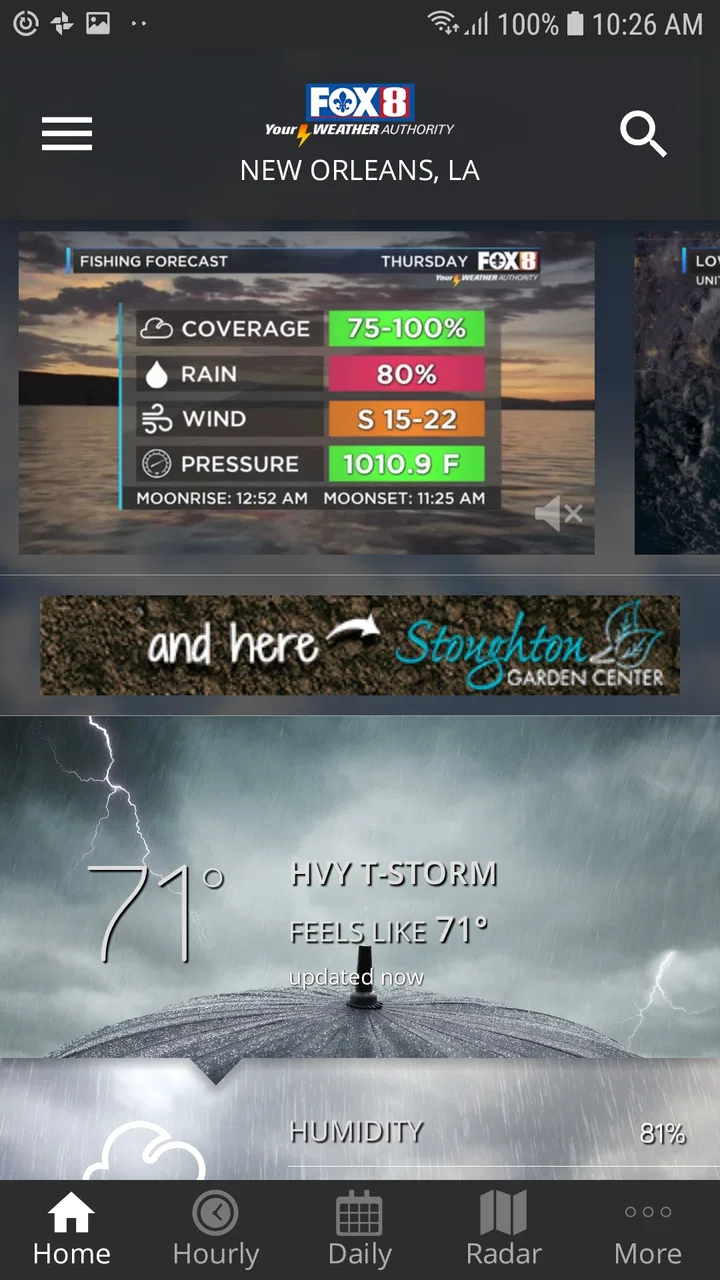
FOX 8 Weather is a weather app designed to provide current conditions, hourly forecasts, extended outlooks, radar imagery, and weather alerts in one place. It is especially useful for following local conditions, tracking storms, and checking temperature, wind, precipitation, and visibility before traveling or planning outdoor activities. Available features may vary by location and device.
02Does FOX 8 Weather provide severe weather alerts and storm tracking?
The app is intended to help users monitor changing weather, including severe storms and other potentially dangerous conditions. Depending on your location and enabled permissions, it may provide alerts, radar views, forecasts, and updates from the FOX 8 weather team. However, users should not rely on the app alone during emergencies and should also follow official warnings from local authorities.
03Can I use FOX 8 Weather to check forecasts for locations outside my area?
Yes, FOX 8 Weather generally allows users to search for and save additional locations, making it possible to check conditions in other cities or regions. This can be convenient when commuting, traveling, or keeping up with family members elsewhere. Forecast availability and the level of local detail can differ depending on the selected location and the service coverage in that area.
04Does FOX 8 Weather require location access, and can I control those permissions?
Location access is commonly used to display weather conditions and alerts for your current area, but you can usually choose whether the app receives precise or approximate location data. You may also deny permission and manually enter a city instead. Review the app’s privacy settings and your Android or iOS permission controls if you want to limit background location access or notifications.
05Is FOX 8 Weather free to download, and are there advertisements?
FOX 8 Weather is generally available as a free download, allowing users to access core forecasts, radar tools, and weather updates without purchasing the app. Because free apps may be supported by advertising, you can expect promotional content in some sections. Before installing, check the current Google Play or App Store listing for the latest information about ads, subscriptions, in-app purchases, and device compatibility.
Pros
- Clear hourly and extended forecasts for quick planning
- Live radar helps track storms in your area
- Severe weather alerts can provide important advance warning
- Video forecasts offer useful local meteorological updates
- Supports location-based forecasts for home and travel
Cons
- Some features may require location access to work properly
- Forecast accuracy can vary during rapidly changing weather
- Frequent alerts may feel excessive during active weather
- Video content may use significant mobile data
- Some regions may have fewer local weather details

FOX 8 Weather
Gallery